Introduction
vk-graph is a high-performance Vulkan driver for the Rust programming language featuring automated
resource management and execution. It is blazingly-fast, built for real-world use, and supports
modern Vulkan commands1.
This guide book will walk you through the mental model of this crate and help explain how it maps to Vulkan API usage.
Source code and issues live on the GitHub repository. If you find a problem in this guide, please open an issue.
Important
Users should be familiar with the Vulkan specification .
Design
This guide provides a tour of the main public types:
- Driver
- Buffer, Image, Shader, etc..
- Graph
- Builder-pattern for Vulkan commands
- Command
- Explicit command recording and region-level transfer helpers
- Submission
- Automated graph execution
A Graph is built dynamically by your program each frame. Once complete, it is optimized into a
Submission that can be queued for execution on the Vulkan device.
Building and submitting a graph typically takes only a few hundred microseconds.
Philosophy
Vulkan is hard. Synchronization is extremely hard. vk-graph makes Vulkan less painful to write
and a joy to maintain.
The driver is based off the popular ash crate and vk-sync; reasoned as follows:
- Everything is constructed from “
Info” structs; all info isCopy - Match the naming described in the specification
- Support all modern Vulkan usage1 except video2
- Don’t use macro-magic or anything that needs to be learned
- Don’t rely on “helper” functions unless absolutely required
History
- 2018 — Project started privately as a game engine using
Corange - 2020 — Project migrated to Github and named
screen-13 - 2022 — v0.2 released with an earlier graph API based on
Kajiya - 2026 — Project renamed
vk-graph(v0.14) and the graph API was redesigned (v0.14.2)
-
Modern Vulkan usage means no pixel queries. Anything else unsupported is due to there being better options, no current need, or no interest. Please open an issue. ↩ ↩2
-
Video encode/decode is interesting but unsupported. As an alternative consider
ffmpeg,libavcodec, or one of the experimental Rust bindings to the Vulkan video API. ↩
Installation
To get started with vk-graph, add it as a project dependency to your Cargo.toml:
# Cargo.toml

[dependencies]
vk-graph = "0.14"
Features
vk-graph puts a lot of functionality behind optional features in order to optimize compile time for the most common use cases. The following features are available.
checked(enabled by default) — Enable runtime validation for common misuse patterns that Vulkan validation layers cannot always catch.loaded(enabled by default) — Support searching for the Vulkan loader manually at runtime.linked— Link the Vulkan loader at compile time.parking_lot(enabled by default) — Useparking_lotsynchronization primitives internally.ash-molten— Enable MoltenVK loading support on macOS.profile-with-*— Use the specified profiling backend:profile-with-puffin,profile-with-optick,profile-with-superluminal, orprofile-with-tracy
Required Development Packages
Linux (Debian-like):
sudo apt install cmake uuid-dev libfontconfig-dev libssl-dev
Mac OS (10.15 or later):
- Xcode 12
- Python 2.7
brew install cmake ossp-uuid
Windows:
- Install the Vulkan SDK and the current Visual Studio C++ build tools.
Vulkan SDK
Debug mode (setting the debug field of DeviceInfo or InstanceInfo to true) is only supported
when certain validation layers are installed. The Vulkan SDK
provides these layers and a number of helpful
tools.
Important
The installed Vulkan SDK version must be at least v1.3.281.
Optional Distribution-Provided Validation Layers
Linux (Debian-like):
sudo apt install vulkan-validationlayers
Usage
vk-graph acts as a safe builder-pattern for the Vulkan API.
API docs: Graph,
Device,
Graph::begin_cmd,
Graph::bind_resource,
Graph::resource,
Graph::finalize.
Typical usage contains:
#![allow(unused)]
fn main() {
use vk_graph::driver::ash::vk;
use vk_graph::driver::device::Device;

// A borrow of Device is an argument of many vk-graph functions
let device: &Device = &self.device;
}
Resources
Resources, such as buffers and images, may be created from “Info” structs:
#![allow(unused)]
fn main() {
let usage = vk::BufferUsageFlags::TRANSFER_SRC;
let buffer_info = BufferInfo::device_mem(320 * 200 * 4, usage);
let buffer = Buffer::create(device, buffer_info)?;

let usage = vk::ImageUsageFlags::SAMPLED | vk::ImageUsageFlags::TRANSFER_DST;
let image_info = ImageInfo::image_2d(320, 200, vk::Format::R8G8B8A8_UNORM, usage);
let image = Image::create(device, image_info)?;
}
Memory Allocation
vk-graph uses an external memory allocator (currently gpu-allocator) for resource memory
allocations.
The allocation strategy provides a large section of memory which is then sub-allocated for any resources which use it. This may lead to fragmentation and memory exhaustion in some scenarios.
Individual buffers or images may use dedicated memory allocations by setting their alloc_dedicated
field:
#![allow(unused)]
fn main() {
// The info fields may be used or set directly
let uber_mesh_buf = Buffer::create(
    device,
    BufferInfo {
        alloc_dedicated: true,
        ..buffer_info
    }
)?;

// Builder functions are also available
// (builder and info types are interchangeable)
let dedicated_info = image_info.into_builder().alloc_dedicated(true);
let important_image = Image::create(device, dedicated_info)?;
}
Resources may be bound to a graph as typed node handles referred to as “nodes”:
#![allow(unused)]
fn main() {
let mut graph = Graph::default();
let buffer: BufferNode = graph.bind_resource(buffer);
let image: ImageNode = graph.bind_resource(image);
}
Bound resources may be borrowed from graphs, commands, pipeline commands, or command buffers using their node handle:
#![allow(unused)]
fn main() {
let shared_image: &Arc<Image> = graph.resource(image);

assert_eq!(shared_image.info.width, 320);
}
Concrete node types return the exact stored handle type. For example, ImageNode returns
&Arc<Image>. Erased node types such as AnyImageNode instead return &Image so they can unify
owned, leased, and swapchain-backed resources behind one view.
Commands
Nodes may be used with built-in graph commands:
#![allow(unused)]
fn main() {
graph.clear_color_image(image, ClearColorValue::BLACK_ALPHA_ZERO);
}
Graphs may contain many commands:
#![allow(unused)]
fn main() {
graph
    .fill_buffer(buffer, 0..320 * 200, 0)
    .copy_buffer_to_image(buffer, image);
}
Custom commands enable advanced Vulkan behavior:
#![allow(unused)]
fn main() {
graph
    .begin_cmd()
    .resource_access(image, AccessType::TransferRead)
    .resource_access(buffer, AccessType::TransferWrite)
    .record_cmd(move |cmd| {
        // Borrow resources from nodes we move into the closure
        let buffer = cmd.resource(buffer);
        let image = cmd.resource(image);

        // Run *any* Vulkan code using ash::Device
        unsafe {
            // Note: for example only, use safe versions!
            cmd.device.cmd_copy_image_to_buffer2(
                cmd.handle,
                &vk::CopyImageToBufferInfo2::default()
                    .src_image(image.handle)
                    .dst_buffer(buffer.handle),
            );
        }
    })
    .end_cmd();
}
Pipelines
Pipelines allow shader code to execute as a graph command. A borrow of a pipeline may be bound to record shader-stage specific commands:
// compute.glsl
#version 460 core
#pragma shader_stage(compute)

layout(local_size_x = 1, local_size_y = 1, local_size_z = 1) in;

layout(binding = 0, rgba8) writeonly uniform image2D dstImage;

void main() {
    imageStore(
        dstImage,
        ivec2(gl_GlobalInvocationID.x, gl_GlobalInvocationID.y),
        vec4(0.0)
    );
}
# See: "Shader Compilation"
glslc compute.glsl -o compute.spv
#![allow(unused)]
fn main() {
let pipeline = ComputePipeline::create(
    device,
    ComputePipelineInfo::default(),
    include_bytes!("compute.spv").as_slice(),
)?;

graph
    .begin_cmd()
    .bind_pipeline(&pipeline)
    .shader_resource_access(0, image, AccessType::ComputeShaderWrite)
    .record_cmd(|cmd| {
        cmd.dispatch(320, 200, 1);
    });
}
Queue Submission
Completed graphs are queued for execution by a Vulkan implementation.
Note
While executing, resources used in a graph may be bound and used by other graphs. Graph commands access resources in the logical state defined by all prior commands and previously submitted graphs.
Typical programs rely on a single Graph per frame and let their window implementation submit the
graph, but they may do so manually:
#![allow(unused)]
fn main() {
// NOTE: This will stall! Use Fence::status to check periodically instead.
let mut fence = graph
    .finalize()
    .queue_submit(&mut LazyPool::new(device), 0, 0)?;
fence.wait()?;
}
Device Usage
Buffers, images, and acceleration structure resources are created and used by a single Device.
All commands which use a resource must execute on the same Device which created the resource.
Device Creation
Most Vulkan operations occur within the context of a logical device, provided by
Device (a smart pointer for ash::Device).
API docs: Device::create,
Device::try_from_ash,
Device::try_from_display.
Warning
Vulkan has no global state and does not share resources between devices by default.
Do not combine resources from multiple devices! The steps required to share resources across devices are not currently documented.
Headless Operation
For any sort of server-based rendering or similar Vulkan usage without a display, the following is production-ready code used to create a device:
#![allow(unused)]
fn main() {
let info = DeviceInfo::default();
let device = Device::create(info)?;

assert_eq!(device.physical.instance.info.debug, false);
}
Windowed Operation
Prototype and demo code might use the built-in window handler, which creates a Device during
window creation:
# Cargo.toml

[dependencies]
vk-graph-window = "0.1"
#![allow(unused)]
fn main() {
use vk_graph_window::WindowBuilder;

let window = WindowBuilder::default().build()?;

// Before run
let _: &Device = &window.device;

window.run(|frame| {
    // During any frame
    let _: &Device = frame.device;
})?;
}
Advanced
There are several scenarios that require advanced Device creation techniques:
- Allowing user-selection of device
- Custom Window(s) handling
- FFI with OpenXR (or similar)
- Unsupported drivers/platforms
Device Selection
The entrypoint is an Instance from which the available hardware is enumerated and inspected:
#![allow(unused)]
fn main() {
let instance = Instance::create(InstanceInfo::default())?;
let physical_devices = Instance::physical_devices(&instance)?;

for physical_device in physical_devices {
    // We are looking for a device with support for these features
    if !physical_device.vk_khr_swapchain
        || !physical_device
            .vk_khr_ray_tracing_pipeline
            .as_ref()
            .is_some_and(|ext| ext.features.ray_tracing_pipeline)
    {
        continue;
    }

    let _: Device = physical_device.try_into_device()?;
}
}
Native Device Usage
Some scenarios require the Vulkan instance and/or device be created by other code and accepted for
use by vk-graph:
#![allow(unused)]
fn main() {
// Native ash types from somewhere else
let entry: ash::Entry = todo!();
let instance: vk::Instance = todo!();
let physical_device: vk::PhysicalDevice = todo!();

// vk-graph types
let instance = Instance::try_from_entry(entry, instance)?;
let physical_device = unsafe { PhysicalDevice::try_from_ash(&instance, physical_device) }?;

// Use our PhysicalDevice to create a native ash::Device (OpenXR requires this)
let device: ash::Device = unsafe {
    physical_device
        .create_ash_device(|create_info| {
            // Somewhere else also provides the logical device!
            let device: vk::Device = todo!();

            let device: ash::Device = unsafe {
                ash::Device::load(instance.fp_v1_0(), device)
            };

            Ok(device)
        })
}.unwrap();

// Create a Device from their native stuff
let device = unsafe { Device::try_from_ash(device, physical_device) }?;
}
Tip
See
examples/vrfor an in-depth example of native device usage.
Shader Compilation
vk-graph does not provide any shader compiler or require any specific shading language. Users must
provide SPIR-V binary-format shaders.
Tip
See Hot Reload for details on a shader compiler provided as a separate crate.
Examples using multiple shading languages and compilers are provided in the
examples/
directory.
Shader-stage #pragma
This applies to GLSL and Shaderc generally but you might find similar functionality with other languages and compilers.
// shader.glsl
#version 460 core
#pragma shader_stage(compute)

void main() {
    // Some code here
}
glslc shader.glsl -o shader.spv
#![allow(unused)]
fn main() {
let compile_time_spirv = include_bytes!("shader.spv");

// #pragma allows for from_spirv syntax:
let shader = Shader::from_spirv(
    compile_time_spirv.as_slice(),
);

// Without this #pragma we must specify stage:
let shader = Shader::new_compute(
    compile_time_spirv.as_slice(),
);

// For dynamically loaded SPIR-V (e.g. from a file at runtime), use try_new_*
// to handle invalid shader code gracefully:
let runtime_spirv = load_spirv_from_disk();
match Shader::try_new_compute(runtime_spirv.as_slice()) {
    Ok(_shader) => { /* use shader */ }
    Err(e) => { eprintln!("Shader compilation failed: {e}"); }
}
}
Threading Behavior
vk-graph is intended to provide scalable performance when used on multiple host threads.
Resources are externally synchronized, and mutable graph-building APIs such as Graph::begin_cmd
require exclusive access to the Graph itself.
API docs: Submission,
RecordedSubmission,
Submission::queue_submit,
Submission::record_resource,
Submission::record_resource_dependencies,
RecordedSubmission::queue_submit,
CommandBuffer::has_executed.
More precisely, vk-graph stores the most recent access type of each subresource of a resource. As
commands are submitted to the Vulkan implementation queue, the internal state of these resources is
updated.
Resource state is updated during the following function calls:
Submission::queue_submitSubmission::record_resourceSubmission::record_resource_dependenciesRecordedSubmission::queue_submit
Caution
Do not call any
Submissionrecording or queue function that accesses buffers, images, or acceleration structures currently being submitted on other threads.
Execution
The provided Submission recording and queue functions are designed to support a typical
frame-presentation workflow:
- Queue all commands the presented frame depends on
- Acquire the presentation image, usually through
Graphchain - Queue frame commands that write the presentation image
- Present the frame
- Submit any final unrelated commands
Safe Patterns
Resources (buffers, images, or acceleration structures) are the only mutable types which require any
thread safety notes. All other types provided by vk-graph are immutable data structures or Vulkan
handle smart pointers.
For example, there is no race condition or thread contention caused by using the same pipeline on two threads.1 In fact, there is no runtime overhead at all from this.
Additionally, it is safe to build Graph instances, bind resources, record command buffers, and
call Graph::finalize at any time on any thread, as long as each Graph instance is not
mutably shared across threads at the same time.
These patterns are safe:
- Build
GraphandSendto another thread for submission - Build
GraphandDropit without submission Sendresources to other threads or share asArc<T>Clonedevices or pipelines andSendthem to other threads
Risky Patterns
Host-mappable buffers require extra understanding to use properly.
The contents of a buffer are undefined from the time of submission until the returned Fence is
signaled. Use Fence::status or Fence::wait before reading or writing host-mapped memory touched
by that submission.
-
The internal implementation of
GraphicsPipelinedoes do a bit of caching in order to improve performance, however this behavior should not generate issues with any reasonable workload. ↩
Window Handling
vk-graph does not directly provide any window implementation. Instead an accessory crate,
vk-graph-window is provided, based on winit.
Tip
vk-graph-windowprovides additional documentation and examples.
Presentation
The core crate and window crate intentionally separate low-level Vulkan presentation from the frame-oriented helper used by most windowed applications.
| Type | Usage |
|---|---|
vk_graph::driver::swapchain::Swapchain | Vulkan swapchain smart pointer, contains “raw” functions |
vk_graph_window::graphchain::Graphchain | High-level frame-presentation helper for window handlers |
Graphchain acquires the next swapchain image, exposes it through FrameContext, submits the
frame graph, and presents it. Applications normally use Window::run and write to
frame.swapchain_image rather than calling low-level acquire/present functions directly.
GraphchainInfo controls presentation policy such as frame_capacity, min_image_count,
present_mode, acquire_timeout, and composite_alpha. The effective runtime values are exposed
through EffectiveGraphchainInfo because surface capabilities may force different values at runtime.
Resize and surface transitions may cause a frame to be skipped internally. If the surface is lost, the window layer tears down the current surface/graphchain and recreates them on a later draw request.
OpenXR
Virtual reality support via OpenXR is provided as an example which also implements a swapchain.
MoltenVK
Vulkan is emulated on Apple platforms using MoltenVK.
Warning
MoltenVK does not support all Vulkan features and has limited extension and format support. Pay particular attention to these areas:
- Bindless descriptor count limit
- Hardware queues provided for execution
- Indirect drawing command support
- Image format support
Support for MoltenVK is best-effort and may not always be up to date. In the event that any
vk-graph workflow does not work using MoltenVK please
open an issue
.
Debugging
Debug mode is enabled by setting the debug field of DeviceInfo or InstanceInfo to true.
It requires VK_EXT_debug_utils and VK_EXT_private_data support. Construction fails in debug mode
when those requirements are unavailable.
A compatible Vulkan SDK is required for validation layers and debugging tools.
Important
The installed Vulkan SDK version must be at least v1.3.281.
While in debug mode vk-graph watches for errors, warnings, and certain performance warnings
emitted from any currently enabled Vulkan debug application layers. Emitted events will cause the
active thread to be parked and log a message indicating how to attach a debugger.
RenderDoc Labels
When debug mode is active, vk-graph emits Vulkan debug-utils object names and command label regions
for RenderDoc and similar tools.
Resources and pipelines expose a setter and builder-style helper:
#![allow(unused)]
fn main() {
let buffer = Buffer::create(
    device,
    BufferInfo::device_mem(1024, vk::BufferUsageFlags::STORAGE_BUFFER),
)?.with_debug_name("work buffer");

buffer.set_debug_name("renamed work buffer");
}
Pipeline debug names are propagated to internal Vulkan objects such as pipeline layouts and descriptor set layouts. Command names become debug label regions during submission recording. Swapchain images are also named by index.
Logging
vk-graph uses log v0.4 for low-overhead logging.
To enable logging, set the RUST_LOG environment variable to trace, debug, info, warn or
error and initialize the logging provider of your choice. Examples use pretty_env_logger.
You may also filter messages, for example:
RUST_LOG=vk_graph::driver=trace,vk_graph=warn cargo run --example ray_trace
TRACE vk_graph::driver::instance > created a Vulkan instance
DEBUG vk_graph::driver::physical_device > physical device: NVIDIA GeForce RTX 3090
DEBUG vk_graph::driver::physical_device > extension "VK_KHR_16bit_storage" v1
DEBUG vk_graph::driver::physical_device > extension "VK_KHR_8bit_storage" v1
DEBUG vk_graph::driver::physical_device > extension "VK_KHR_acceleration_structure" v13
...
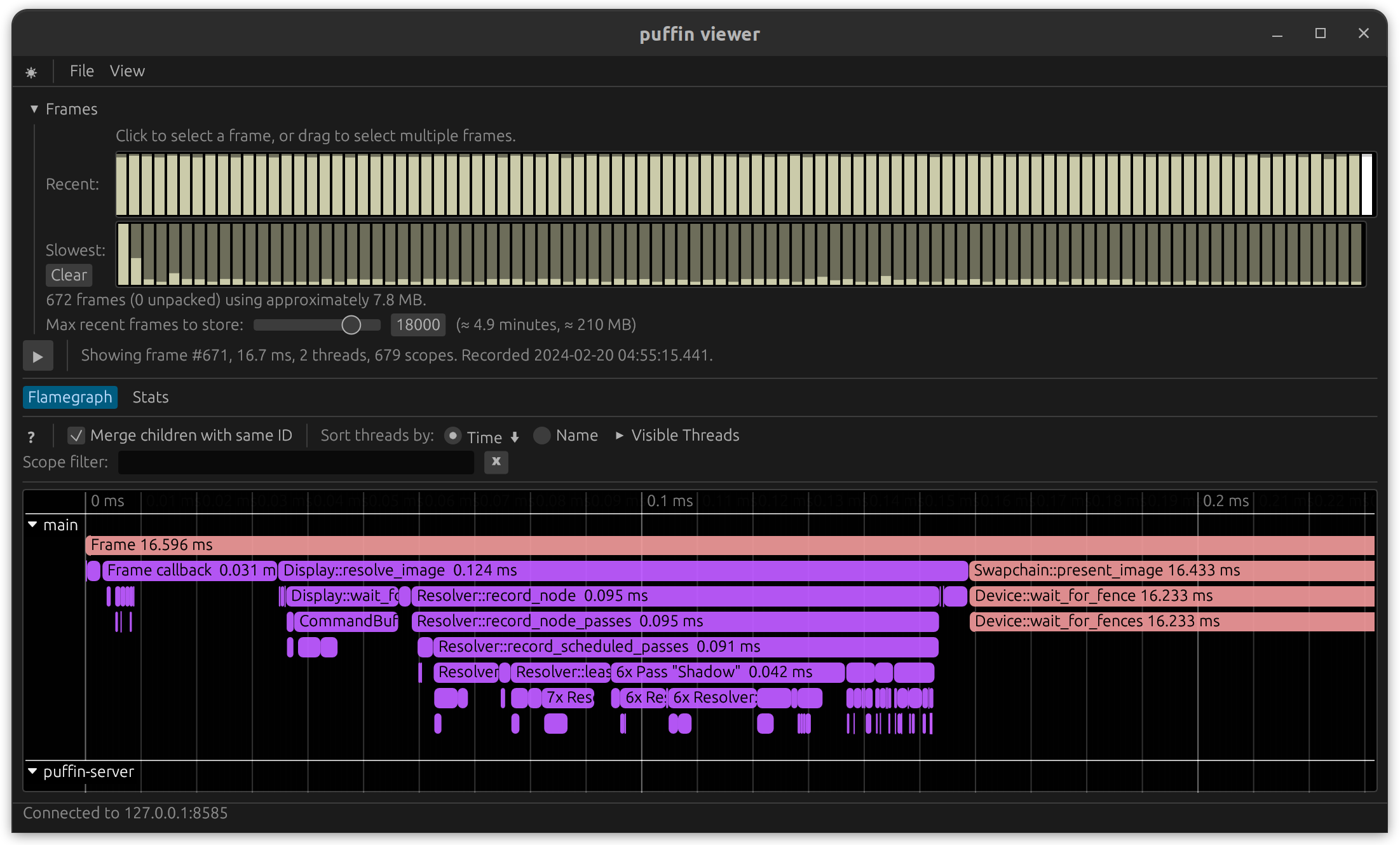
Performance Profiling
vk-graph uses profiling v1.0 and supports multiple profiling providers. When
not in use profiling has zero cost.
To enable profiling, compile with one of the profile-with-* features enabled and initialize the
profiling provider of your choice.
Example using puffin:
cargo run --features profile-with-puffin --release --example vsm_omni
Comparing Results
Always profile code using a release-mode build.
You may need to disable CPU thermal throttling in order to get consistent results on some platforms. The inconsistent results are certainly valid, but they do not help in accurately measuring potential changes. This may be done on Intel Linux machines by modifying the Intel P-State driver:
echo 100 | sudo tee /sys/devices/system/cpu/intel_pstate/min_perf_pct
(Source )
checked Feature
vk-graph provides a checked Cargo feature that enables runtime validation of common
misuse patterns that the VVL cannot catch:
- Missing
resource_access/shader_resource_accessdeclarations before using a resource update_bufferand command-levelcopy_bufferbuffer bounds- Valid image aspect masks and subresource ranges
- Cross-graph node ownership checks
The checked feature is enabled by default — it activates in both debug and release builds.
Disable it for zero-overhead release builds that have been validated:
With checked disabled, vk-graph no longer fail-fast validates that a node handle belongs to the
graph it is used with. That remains invalid usage; the caller is responsible for avoiding it.
cargo run --no-default-features --features loaded,parking_lot --release
Vulkan Validation Layer
Vulkan is a zero-overhead API — the specification does not mandate that drivers validate every dynamic state precondition. The Vulkan Validation Layer (VVL) exists for that purpose during development.
vk-graph does not add eager runtime assertions for conditions that the VVL already catches (e.g.
missing extensions, invalid dynamic state, incorrect usage patterns). Doing so would burn CPU cycles
in release builds, duplicate effort, and create a false sense of safety for conditions the caller
cannot reasonably act on at the call site.
This is different from normal application code: incorrect API usage in graphics programming produces undefined behavior and the hardware silently consumes invalid calls. The right place to catch these mistakes is during development with the VVL, not with eager checks in every function.
When running with validation enabled, set VK_GRAPH_SKIP_VALIDATION_PARK=1 so validation errors
fail fast instead of parking the process waiting for a debugger.
Helpful tools
- VulkanSDK
(Required when setting
debugtotrue) - NVIDIA: nvidia-smi
- AMD: RadeonTop
- RenderDoc
Resources
API docs: Graph::bind_resource,
Graph::resource,
Node,
Pool,
Cache,
GarbageCollector.
Caution
All pipelines and resources (buffers, images, and acceleration structures) used in a
Graphmust have been created using the sameDevice.
Owned resources are created from Device references. They may be bound directly to graphs.
An Arc<T> or &Arc<T> of any resource may be bound to a graph if the resource needs to be
referenced in future graphs.
Binding
Binding resources to a graph produces a “Node” handle which may be used in commands and shader pipelines.
Example for buffers using Graph::bind_resource<R>(&mut self, resource: R) -> R::Node:
R | N |
|---|---|
Buffer | BufferNode |
Arc<Buffer> | BufferNode |
Lease<Buffer> | BufferLeaseNode |
Arc<Lease<Buffer>> | BufferLeaseNode |
Borrowing
Resources may be borrowed from a graph.
Example for buffers using Graph::resource<N>(&self, node: N) -> &N::Resource:
N | R |
|---|---|
BufferNode | Arc<Buffer> |
BufferLeaseNode | Arc<Lease<Buffer>> |
Bound Resource Nodes
The concept of binding resources to graphs as node handles exists to support the callback-style
command buffer recording provided by vk-graph.
Commands are recorded in logical order, but the execution is re-ordered for performance and so a
closure argument is provided to call Vulkan command buffer functions. The use of a small and Copy
node handle allows resource handles to be moved into command buffer closures without Arc::clone.
Additionally, node handles support internal optimizations by providing direct indexed access to graph data structures.
Pooling Resources
Pooled resources are requested from Pool implementations. Dropped resources return to the pool.
The Lease<T> return type otherwise acts like an owned resource.
Cached Resources
Resource caching is available using Cache
over any Pool.
Cached resources let complex graphs reuse compatible resources while keeping the pooling strategy separate from the reuse policy.
Garbage Collection
The built-in pools may be wrapped in GarbageCollector to automatically remove cached acceleration
structures, buffers, and images that no longer match the application’s requests. Successful requests
are observed until GarbageCollector::collect_resources is called. Collection retains resources
supporting those requests, then starts a new observation interval.
Calling collect_resources without making any requests clears all managed resources. Checked-out
resources remain valid during collection; a resource returning to a retained bucket is considered by
the next collection.
Queue Sharing
BufferInfo and ImageInfo both expose sharing_mode.
vk::SharingMode::EXCLUSIVEis the default and letsvk-graphtrack queue-family ownership.vk::SharingMode::CONCURRENTmakes the resource usable by multiple queue families without exclusive ownership transfer tracking.
Exclusive buffer and image ownership is range-aware. Transfer planning only considers ranges touched by submitted commands, and barrier emission intersects ownership transfers with the resource ranges actually accessed by those commands.
Buffers
#![allow(unused)]
fn main() {
let size = 1_024;
let usage = vk::BufferUsageFlags::STORAGE_BUFFER;

// Create buffer info multiple ways:
let info = BufferInfo {
    alignment: 1,
    alloc_dedicated: false,
    host_readable: false,
    host_writable: false,
    sharing_mode: vk::SharingMode::EXCLUSIVE,
    size,
    usage,
};
let device_mem = BufferInfo::device_mem(size, usage);
let host_mem = BufferInfo::host_mem(size, usage);

assert_eq!(info, device_mem);
assert_ne!(info, host_mem);

// Builder pattern
let same_info = BufferInfoBuilder::default()
    .size(size)
    .usage(usage);

// Info built from other info
let more_info = host_mem
    .into_builder()
    .usage(usage | vk::BufferUsageFlags::INDIRECT_BUFFER)
    .build();

// There is a helper function for creating buffers from a slice
let data = [1u8, 2, 3, 4];
let buffer = Buffer::create_from_slice(device, usage, &data)?;

// This is equivalent to:
let mut buffer = Buffer::create(device, host_mem)?;
buffer.copy_from_slice(0, &data);

// Or use the std copy_from_slice (it panics if size != range)
let mut buffer = Buffer::create(device, host_mem)?;
buffer.mapped_slice_mut().copy_from_slice(&data);

// The provided fields are helpful:
assert_eq!(buffer.device, *device);
assert_eq!(buffer.info, host_mem);
assert_ne!(buffer.handle, vk::Buffer::null());

// Buffer "subresources" are just ranges of that buffer
let my_subresource = 0..size;
}
Images
#![allow(unused)]
fn main() {
let (width, height) = (320, 200);
let usage = vk::ImageUsageFlags::SAMPLED;
let fmt = vk::Format::R8G8B8A8_UNORM;

// Create image info multiple ways
let info = ImageInfo {
    array_layer_count: 1,
    alloc_dedicated: false,
    depth: 1,
    flags: vk::ImageCreateFlags::empty(),
    format: fmt,
    height,
    host_readable: false,
    host_writable: false,
    mip_level_count: 1,
    sample_count: SampleCount::Type1,
    sharing_mode: vk::SharingMode::EXCLUSIVE,
    tiling: vk::ImageTiling::OPTIMAL,
    image_type: vk::ImageType::TYPE_2D,
    usage,
    width,
};
let other_info = ImageInfo::image_2d(width, height, fmt, usage);
let cube_info = ImageInfo::cube(width, fmt, usage);

assert_eq!(info, other_info);
assert_ne!(info, cube_info);

// Builder pattern
let same_info = ImageInfoBuilder::default()
    .width(width)
    .height(height)
    .depth(1)
    .format(fmt)
    .usage(usage)
    .image_type(vk::ImageType::TYPE_2D);

// Info built from other info
let array_info = cube_info
    .into_builder()
    .flags(vk::ImageCreateFlags::TYPE_2D_ARRAY_COMPATIBLE)
    .build();

// Images are created simply
let image = Image::create(device, info)?;

// For interop this may be handy:
let image = unsafe { Image::from_raw(device, vk::Image::null(), info) };

// The provided fields are helpful:
assert_eq!(image.device, *device);
assert_eq!(image.info, info);
assert_ne!(image.handle, vk::Image::null());

// Image "subresources" are the native type:
let my_subresource = vk::ImageSubresourceRange {
    aspect_mask: vk::ImageAspectFlags::COLOR,
    base_mip_level: 0,
    level_count: 1,
    base_array_layer: 0,
    layer_count: 1,
};

// Image views are also subresources:
let image_view = ImageViewInfo {
    array_layer_count: 1,
    aspect_mask: vk::ImageAspectFlags::COLOR,
    base_array_layer: 0,
    base_mip_level: 0,
    format: fmt,
    mip_level_count: 1,
    view_type: vk::ImageViewType::TYPE_2D,
};

// Image views have the same builder functionality:
let other_view = ImageViewInfoBuilder::default();

// Image views can be inferred from the whole image info:
let addl_view = info.into_image_view();

assert_eq!(image_view, addl_view);
}
Acceleration Structures
#![allow(unused)]
fn main() {
// Some buffer holding geometry data
let buffer: Buffer = todo!();

// Some sample geometry to put into a BLAS:
let geometry = AccelerationStructureGeometryData::Triangles {
    index_addr: DeviceOrHostAddress::DeviceAddress(
        buffer.device_address()
    ),
    index_type: vk::IndexType::UINT16,
    max_vertex: 100,
    transform_addr: None,
    vertex_addr: DeviceOrHostAddress::DeviceAddress(
        buffer.device_address() + 2_048
    ),
    vertex_format: vk::Format::R32G32B32_SFLOAT,
    vertex_stride: 12,
};
let geom = AccelerationStructureGeometry {
    max_primitive_count: 120,
    flags: vk::GeometryFlagsKHR::OPAQUE,
    geometry,
};
let build_range = vk::AccelerationStructureBuildRangeInfoKHR {
    primitive_count: 120,
    primitive_offset: 0,
    first_vertex: 0,
    transform_offset: 0,
};
let ty = vk::AccelerationStructureTypeKHR::BOTTOM_LEVEL;
let geom_info = AccelerationStructureGeometryInfo {
    acceleration_structure_type: ty,
    flags: vk::BuildAccelerationStructureFlagsKHR::ALLOW_UPDATE,
    geometries: vec![
        (geom, build_range),
    ].into_boxed_slice(),
};

// Use helper function to find size
let AccelerationStructureSize {
    build_size,
    ..
} = AccelerationStructure::size_of(device, &geom_info);

// Create acceleration structure info multiple ways:
let info = AccelerationStructureInfo {
    acceleration_structure_type: ty,
    size: build_size,
};
let other_info = AccelerationStructureInfo::blas(build_size);

assert_eq!(info, other_info);

// Builder pattern
let same_info = AccelerationStructureInfoBuilder::default()
    .acceleration_structure_type(ty)
    .size(build_size);

// Create directly from info
let blas = AccelerationStructure::create(device, info)?;

// Info built from other info
// Note: Never calculate size/always get from function
let more_info = blas
    .info
    .into_builder()
    .size(build_size * 2)
    .build();

// The provided fields are helpful:
assert_eq!(blas.buffer.device, *device);
assert_eq!(blas.info, info);
assert_ne!(blas.buffer.handle, vk::Buffer::null());
assert_ne!(blas.handle, vk::AccelerationStructureKHR::null());

// Acceleration structures have no "subresources" and are bound whole
}
Pipelines
Caution
All pipelines and resources (buffers, images, and acceleration structures) used in a
Graphmust have been created using the sameDevice.
Pipelines are created from Device references. They may be bound to graph commands.
#![allow(unused)]
fn main() {
let info = ComputePipelineInfo::default();
let shader = include_bytes!("shader.spv");
let pipeline = ComputePipeline::create(device, info, shader.as_slice())?;

let mut graph = Graph::default()
    .begin_cmd()
    .bind_pipeline(&pipeline)
    .record_cmd(|cmd| {
        // Record vulkan commands here
    })
    .end_cmd();
}
Pipelines are cheap to Clone and should be cached in between use. The recommendation is to bind a
borrow of a pipeline to when beginning a command.
Commands
A graph command is the smallest unit which the Submission type will schedule for execution.
Calls to Graph::begin_cmd (and, optionally Graph::end_cmd) define a single graph command which
will execute in physical order as recorded. During graph command recording you may change pipelines,
modify shader descriptor bindings, or otherwise modify the state of the command buffer.
Example:
#![allow(unused)]
fn main() {
let info = ComputePipelineInfo::default();

let fire = include_bytes!("fire.spv");
let fire = ComputePipeline::create(device, info, fire.as_slice())?;

let water = include_bytes!("water.spv");
let water = ComputePipeline::create(device, info, water.as_slice())?;

let mut graph = Graph::default();
graph
    .begin_cmd()
    .bind_pipeline(&fire)
    .record_cmd(|cmd| {
        println!("1st");
    })
    .bind_pipeline(&water)
    .record_cmd(|cmd| {
        println!("2nd");
    })
    .bind_pipeline(&fire)
    .record_cmd(|cmd| {
        println!("3rd");
    })
    .end_cmd()
    .begin_cmd()
    .bind_pipeline(&water)
    .record_cmd(|cmd| {
        println!("4th");
    });
}
A call to Graph::end_cmd is not required. The end-command method exists to support builder-style
function-chaining. In the above example two commands are built and added to the graph. If you want a
standalone command builder, Command::builder(&mut graph) and begin_cmd().into_builder() expose
the same command-level transfer helpers and finish with push_cmd() or build().
Shaders
Compute, graphics, and ray tracing pipelines require one or more shaders:
| Pipeline Type | Shaders |
|---|---|
ComputePipeline | Single: must be compute stage |
GraphicsPipeline | Multiple: must be a raster stage |
RayTracingPipeline | Multiple: must be a ray tracing stage |
Caution
All
Shaderconstructors panic when provided with invalid SPIR-V shader code.
The Shader type uses a builder pattern:
#![allow(unused)]
fn main() {
// Pipelines may be created using "shader" or "custom":
let code = include_bytes!("raygen.spv");
let shader = Shader::from_spirv(code.as_slice());
let custom = shader
                .entry_name("main_but_faster")
                .image_sampler(0, SamplerInfo::default())
                .image_sampler(1, SamplerInfo::LINEAR);
}
Hot Reload
An accessory crate is provided to support automatic reloading of changed shader pipelines.
vk-graph-hot uses a file watcher and Shaderc. It may be used directly or may be swapped out
using a build feature:
# Cargo.toml

[features]
default = []
hot = ["dep:vk-graph-hot"]

[dependencies]
vk-graph = "0.14"
vk-graph-hot = { version = "0.1", optional = true }
#![allow(unused)]
fn main() {
use vk_graph::driver::{DriverError, compute::ComputePipelineInfo, device::Device};

#[cfg(feature = "hot")]
use vk_graph_hot::{
    HotComputePipeline as ComputePipeline,
    HotShader,
};

#[cfg(not(feature = "hot"))]
use vk_graph::driver::{
    compute::ComputePipeline,
    shader::Shader,
};

pub fn create_fire_pipeline(
    device: &Device,
) -> Result<ComputePipeline, DriverError> {
    let info = ComputePipelineInfo::default();

    #[cfg(feature = "hot")]
    let shader = HotShader::from_path("fire.glsl");

    #[cfg(not(feature = "hot"))]
    let shader = Shader::from_spirv(include_bytes!("fire.spv").as_slice());

    ComputePipeline::create(device, info, shader)
}
}
Note
The hot versions of each type support all features, options, and usage provided by the normal types. This include public fields, available information, and graph binding features.
Push Constants
Command buffers may update a very small data cache which shaders may read during execution using push constants.
The Vulkan minimum is 128 bytes, but many devices expose a larger limit.
Check PhysicalDeviceLimits::max_push_constants_size
and keep the payload small.
API docs: ComputeCommandRef::push_constants,
GraphicsCommandRef::push_constants,
RayTracingCommandRef::push_constants.
// render_mesh.glsl
#version 460 core

layout(push_constant) uniform PushConstants {
    layout(offset = 0) uint mesh_index;
};

...
#![allow(unused)]
fn main() {
let info = ComputePipelineInfo::default();
let code = include_bytes!("render_mesh.spv");
let shader = Shader::new_compute(code.as_slice());
let pipeline = ComputePipeline::create(device, info, shader)?;

let mut graph = Graph::default();
let data = 42u32.to_ne_bytes();

graph
    .begin_cmd()
    .bind_pipeline(&pipeline)
    .record_cmd(move |cmd| {
        cmd
            .push_constants(0, &data)
            .dispatch(1, 1, 1);
    });
}
Tip
A crate such as
bytemuckis helpful for converting Rust structures to bytes suitable for push constant usage. See the example code for more.
Specialization
Pipeline specialization allows pre-compiled SPIR-V binary shaders to be specialized with constant values specified at run-time.
The Vulkan implementation may use these constant values to generate optimized shader code.
vk-graph provides SpecializationMap as an easy-to-use way of storing the data and lookup entries
required to use this feature.
// kaboom.glsl
#version 460 core

layout(constant_id = 0) const float INFERNO_EPSILON = 0.999;
layout(constant_id = 1) const float COEFF_OF_BOOM = 1.4;
#![allow(unused)]
fn main() {
use bytemuck::bytes_of;

let kaboom = include_bytes!("kaboom.spv");

// Use this shader for the glsl-specified values:
let shader = Shader::new_compute(kaboom.as_slice());

let better_consts = [
    0.99999f32,
    1.0,
];
let better_consts = bytes_of(&better_consts);
let spec = SpecializationMap::new(better_consts)
    .constant(0, 0, 4)
    .constant(1, 4, 8);

// Use this shader for the updated run-time values:
let spec_shader = shader.specialization(spec);
}
Synchronization
vk-graph provides a high-performance abstraction over Vulkan synchronization which retains the
low driver overhead of correctly synchronized command buffers.
Pipeline Barriers
Vulkan specifies that resources and pipelines will have synchronized access when barriers are inserted into the command stream. Unsynchronized access results in undefined behavior.
Tip
Unsynchronized access may be detected through debug assertions or Vulkan SDK debugging layers.
Access Type Abstraction
vk-graph uses an enumeration of possible states to define all supported pipeline barriers in an
easy-to-use way.
Sample access types:
| Type | Usage |
|---|---|
AccessType::General | Covers any access - useful for debug, generally avoid for performance reasons |
AccessType::ColorAttachmentWrite | Written as a color attachment during rendering |
AccessType::ComputeShaderReadUniformBuffer | Read as a uniform buffer in a compute shader |
Resource Access
The required access varies depending on the function being called and what the Vulkan specification requires for a given command.
Generally, access must be specified before each command uses a resource. It appears as an “access” function call:
#![allow(unused)]
fn main() {
graph
    .begin_cmd()
    .resource_access(some_buffer, AccessType::TransferRead)
    .resource_access(some_image, AccessType::TransferWrite)
    .record_cmd(|cmd| {
        // we are synchronized!
        // You may:
        //  - Read some_buffer
        //  - Write some_image
    });
}
Resource access is specified for and consumed by the following command buffer recording. For multiple accesses, use multiple “access” and “record” function calls:
#![allow(unused)]
fn main() {
graph
    .begin_cmd()
    .resource_access(buffer, AccessType::TransferRead)
    .resource_access(image, AccessType::TransferWrite)
    .record_cmd(|cmd| {
        // Safe to copy buffer to image
    })
    .resource_access(image, AccessType::TransferRead)
    .resource_access(buffer, AccessType::TransferWrite)
    .record_cmd(|cmd| {
        // Safe to copy image to buffer
    });
}
Shader Resource Access
When a resource (buffer, image, or acceleration structure) is accessed from a shader the
shader_resource_access function is used:
// clear_image.glsl
#version 460 core
#pragma shader_stage(compute)

layout(binding = 42, rgba8) writeonly uniform image2D dstImage;

void main() {
    imageStore(
        dstImage,
        ivec2(gl_GlobalInvocationID.x, gl_GlobalInvocationID.y),
        vec4(0)
    );
}
#![allow(unused)]
fn main() {
let mut graph = Graph::default();

let fmt = vk::Format::R8G8B8A8_UNORM;
let usage = vk::ImageUsageFlags::STORAGE;
let info = ImageInfo::image_2d(32, 32, fmt, usage);
let image = graph.bind_resource(Image::create(
    device,
    info,
)?);

graph
    .begin_cmd()
    .bind_pipeline(ComputePipeline::create(
        device,
        ComputePipelineInfo::default(),
        include_bytes!("clear_image.spv").as_slice(),
    )?)
    .shader_resource_access(42, image, AccessType::ComputeShaderWrite)
    .record_cmd(|cmd| {
        cmd.dispatch(32, 32, 1);
    });
}
Subresource Access
Buffer ranges and image views are referred to as subresource ranges and accessed using “subresource” function variants:
#![allow(unused)]
fn main() {
let mut graph = Graph::default();

let fmt = vk::Format::R8G8B8A8_UNORM;
let usage = vk::ImageUsageFlags::STORAGE;
let info = ImageInfo::image_2d(32, 32, fmt, usage);
let image = graph.bind_resource(Image::create(
    device,
    info,
)?);

graph
    .begin_cmd()
    .bind_pipeline(ComputePipeline::create(
        device,
        ComputePipelineInfo::default(),
        include_bytes!("clear_image.spv").as_slice(),
    )?)
    .shader_subresource_access(42, image, info, AccessType::ComputeShaderWrite)
    .record_cmd(|cmd| {
        cmd.dispatch(32, 32, 1);
    });
}
Built-In Commands
The commands directly attached to a Graph, such as Graph::copy_buffer_to_image, do not require
any access function calls.
The source code for these built-in commands uses public graph functions and provides good examples of typical usage.
Commands
vk-graph exposes two styles of commands:
API docs: Graph::begin_cmd,
Graph::builder,
Command::record_cmd,
Graph::finalize.
- Built-in graph commands such as
copy_buffer,clear_color_image, andupdate_buffer - Explicit command-buffer recording through
begin_cmd().record_cmd(...)
The built-in commands are the easiest place to start. They automatically describe the required transfer access and insert the synchronization they need.
Built-In Commands
These helpers cover common transfer-style work:
| Command | Typical use |
|---|---|
blit_image | Scale or format-convert one image into another |
clear_color_image | Clear a color render target, staging image, or scratch image |
clear_depth_stencil_image | Initialize or reset a depth/stencil image |
copy_buffer | Copy data between buffers |
copy_buffer_to_image | Upload staging-buffer contents into an image |
copy_image | Copy texels between images without filtering |
copy_image_to_buffer | Read back image data into a buffer |
fill_buffer | Fill a buffer region with a repeated u32 value |
update_buffer | Upload up to 64 KiB of inline data directly into a buffer |
Typical Flow
The most common pattern is to stage data in a buffer, upload it into an image, and then clear or copy other resources as part of the same graph:
let mut graph = Graph::default();

let staging = Buffer::create(
    &device,
    BufferInfo::host_mem(
        256 * 256 * 4,
        vk::BufferUsageFlags::TRANSFER_SRC | vk::BufferUsageFlags::TRANSFER_DST,
    ),
)?;
let upload_image = Image::create(
    &device,
    ImageInfo::image_2d(
        256,
        256,
        vk::Format::R8G8B8A8_UNORM,
        vk::ImageUsageFlags::TRANSFER_DST
            | vk::ImageUsageFlags::TRANSFER_SRC
            | vk::ImageUsageFlags::SAMPLED,
    ),
)?;
let mip_preview = Image::create(
    &device,
    ImageInfo::image_2d(
        128,
        128,
        vk::Format::R8G8B8A8_UNORM,
        vk::ImageUsageFlags::TRANSFER_DST | vk::ImageUsageFlags::SAMPLED,
    ),
)?;
let readback = Buffer::create(
    &device,
    BufferInfo::host_mem(
        128 * 128 * 4,
        vk::BufferUsageFlags::TRANSFER_DST,
    ),
)?;

let staging = graph.bind_resource(staging);
let upload_image = graph.bind_resource(upload_image);
let mip_preview = graph.bind_resource(mip_preview);
let readback = graph.bind_resource(readback);

graph
    .update_buffer(staging, 0, [0xff; 64])
    .copy_buffer_to_image(staging, upload_image)
    .blit_image(upload_image, mip_preview, vk::Filter::LINEAR)
    .clear_color_image(mip_preview, [0.1, 0.2, 0.3, 1.0])
    .copy_image_to_buffer(mip_preview, readback)
    .fill_buffer(readback, 0..64, 0);
Choosing The Right Command
- Use
update_bufferfor small inline uploads that fit in Vulkan’scmd_update_bufferlimits. - Use
fill_bufferwhen you need a repeatedu32pattern, often for resets or counters. - Use
copy_buffer_to_imageandcopy_image_to_bufferfor upload and readback paths. - Use
copy_imagewhen source and destination texel footprints already match. - Use
blit_imagewhen you need scaling or filtering. - Use
begin_cmd()command methods when you need precise offsets, layers, mip levels, or partial copies.
Explicit Regions
Whole-resource helpers live on Graph. Explicit-region transfer methods live on Command. Use the
Command versions to compose with debug_name, resource access declarations, and other command
recording.
let mut graph = Graph::default();

let src = graph.bind_resource(Buffer::create(
    &device,
    BufferInfo::host_mem(4096, vk::BufferUsageFlags::TRANSFER_SRC),
)?);
let dst = graph.bind_resource(Buffer::create(
    &device,
    BufferInfo::device_mem(4096, vk::BufferUsageFlags::TRANSFER_DST),
)?);

graph
    .begin_cmd()
    .debug_name("copy buffer region")
    .copy_buffer(
        src,
        dst,
        [vk::BufferCopy {
            src_offset: 512,
            dst_offset: 1024,
            size: 256,
        }],
    )
    .end_cmd();
Graph Builder
Graph::builder() offers the same whole-resource helpers in a chainable style and finishes with
build():
let graph = Graph::builder()
    .update_buffer(buffer, 0, [1, 2, 3, 4])
    .copy_buffer_to_image(buffer, image)
    .build();
Computing
Compute commands are recorded after binding a ComputePipeline. They are typically paired with
shader_resource_access for storage buffers or images, and resource_access for indirect argument
buffers.
API docs: ComputeCommandRef::dispatch,
ComputeCommandRef::dispatch_base,
ComputeCommandRef::dispatch_indirect,
ComputeCommandRef::push_constants.
Available Commands
| Command | Typical use |
|---|---|
dispatch | Launch workgroups directly from CPU-provided dimensions |
dispatch_base | Launch workgroups with a non-zero base workgroup ID |
dispatch_indirect | Read dispatch dimensions from a buffer on the device |
push_constants | Update small pipeline constants without a buffer upload |
Direct Dispatch
dispatch is the default option. Use it when the CPU already knows the workgroup count.
let mut graph = Graph::default();

let output = graph.bind_resource(Buffer::create(
    &device,
    BufferInfo::device_mem(
        4096,
        vk::BufferUsageFlags::STORAGE_BUFFER,
    ),
)?);

let pipeline = ComputePipeline::create(
    &device,
    ComputePipelineInfo::default(),
    Shader::new_compute([0u8; 4].as_slice()),
)?;

graph
    .begin_cmd()
    .debug_name("prefix sum")
    .bind_pipeline(&pipeline)
    .shader_resource_access(0, output, AccessType::ComputeShaderWrite)
    .record_cmd(move |cmd| {
        cmd.dispatch(64, 1, 1);
    });
Offset Dispatches
dispatch_base is useful when a pipeline processes a tiled domain and each invocation needs a
non-zero gl_WorkGroupID origin.
let mut graph = Graph::default();

let output = graph.bind_resource(Buffer::create(
    &device,
    BufferInfo::device_mem(4096, vk::BufferUsageFlags::STORAGE_BUFFER),
)?);
let pipeline = ComputePipeline::create(
    &device,
    ComputePipelineInfo::default(),
    Shader::new_compute([0u8; 4].as_slice()),
)?;

graph
    .begin_cmd()
    .bind_pipeline(&pipeline)
    .shader_resource_access(0, output, AccessType::ComputeShaderWrite)
    .record_cmd(move |cmd| {
        cmd.dispatch_base(4, 2, 0, 16, 8, 1);
    });
GPU-Driven Dispatch
dispatch_indirect lets an earlier pass write the group counts into a buffer. The compute pass
then consumes those parameters without CPU intervention.
let mut graph = Graph::default();
let output = graph.bind_resource(Buffer::create(
    &device,
    BufferInfo::device_mem(4096, vk::BufferUsageFlags::STORAGE_BUFFER),
)?);
let args = vk::DispatchIndirectCommand { x: 32, y: 8, z: 1 };
let args_buffer = graph.bind_resource(Buffer::create_from_slice(
    &device,
    vk::BufferUsageFlags::INDIRECT_BUFFER | vk::BufferUsageFlags::TRANSFER_DST,
    bytemuck::cast_slice::<u32, u8>(&[args.x, args.y, args.z]),
)?);
let pipeline = ComputePipeline::create(
    &device,
    ComputePipelineInfo::default(),
    Shader::new_compute([0u8; 4].as_slice()),
)?;

graph
    .begin_cmd()
    .bind_pipeline(&pipeline)
    .resource_access(args_buffer, AccessType::IndirectBuffer)
    .shader_resource_access(0, output, AccessType::ComputeShaderWrite)
    .record_cmd(move |cmd| {
        cmd.dispatch_indirect(args_buffer, 0);
    });
Push Constants
Use ComputeCommandRef::push_constants
for small values that change often, such as frame indices, dispatch parameters,
or other compact state.
graph
    .begin_cmd()
    .bind_pipeline(&pipeline)
    .record_cmd(move |cmd| {
        cmd.push_constants(0, &[42])
            .dispatch(1, 1, 1);
    });
Notes
dispatchanddispatch_baseare the simplest and cheapest commands to drive from CPU code.dispatch_indirectis the usual choice for GPU-generated work queues or culling results.- The bound pipeline and declared resource access determine the synchronization requirements around the dispatch.
Graphics
Graphics commands are recorded after binding a GraphicsPipeline and declaring attachments such as
color_attachment_image or depth_stencil_attachment_image.
API docs: GraphicsCommandRef::draw,
GraphicsCommandRef::draw_indexed,
GraphicsCommandRef::draw_indirect,
GraphicsCommandRef::push_constants.
Available Commands
| Command | Typical use |
|---|---|
bind_index_buffer | Provide indices for indexed drawing |
bind_vertex_buffers | Bind one or more vertex streams |
draw | Draw non-indexed geometry |
draw_indexed | Draw indexed geometry |
draw_indexed_indirect | Read indexed draw parameters from a buffer |
draw_indexed_indirect_count | GPU-driven indexed draws with a count buffer |
draw_indirect | Read non-indexed draw parameters from a buffer |
draw_indirect_count | GPU-driven non-indexed draws with a count buffer |
set_scissor | Restrict drawing to one or more rectangles |
set_viewport | Override the default viewport dynamically |
push_constants | Update small pipeline constants without a buffer upload |
Direct Draws
The most common pattern is to bind vertex and index buffers, then issue draw or draw_indexed.
let mut graph = Graph::default();

let color = graph.bind_resource(Image::create(
    &device,
    ImageInfo::image_2d(
        1280,
        720,
        vk::Format::R8G8B8A8_UNORM,
        vk::ImageUsageFlags::COLOR_ATTACHMENT | vk::ImageUsageFlags::TRANSFER_SRC,
    ),
)?);
let vertices = graph.bind_resource(Buffer::create(
    &device,
    BufferInfo::device_mem(4096, vk::BufferUsageFlags::VERTEX_BUFFER),
)?);
let indices = graph.bind_resource(Buffer::create(
    &device,
    BufferInfo::device_mem(1024, vk::BufferUsageFlags::INDEX_BUFFER),
)?);

let pipeline = GraphicsPipeline::create(
    &device,
    GraphicsPipelineInfo::default(),
    [
        Shader::new_vertex([0u8; 4].as_slice()),
        Shader::new_fragment([0u8; 4].as_slice()),
    ],
)?;

graph
    .begin_cmd()
    .debug_name("main geometry pass")
    .bind_pipeline(&pipeline)
    .color_attachment_image(
        0,
        color,
        LoadOp::Clear(ClearColorValue::Float32([0.0, 0.0, 0.0, 1.0])),
        StoreOp::Store,
    )
    .resource_access(vertices, AccessType::VertexBuffer)
    .resource_access(indices, AccessType::IndexBuffer)
    .record_cmd(move |cmd| {
        cmd
            .bind_vertex_buffers(0, [(vertices, 0)])
            .bind_index_buffer(indices, 0, vk::IndexType::UINT32)
            .draw_indexed(36, 1, 0, 0, 0);
    });
MSAA Resolve
Use color_attachment_image for the multisampled target and color_attachment_resolve_image
for the single-sampled resolve target.
graph
    .begin_cmd()
    .bind_pipeline(&pipeline)
    .color_attachment_image(0, msaa_color, LoadOp::DontCare, StoreOp::DontCare)
    .color_attachment_resolve_image(0, 1, resolve_color)
    .record_cmd(|cmd| {
        cmd.draw(3, 1, 0, 0);
    });
Dynamic Viewports And Scissors
The default viewport covers the full attachment extent and the default scissor does not clip. Override them when a pass renders only part of the target.
let mut graph = Graph::default();
let color = graph.bind_resource(Image::create(
    &device,
    ImageInfo::image_2d(
        1280,
        720,
        vk::Format::R8G8B8A8_UNORM,
        vk::ImageUsageFlags::COLOR_ATTACHMENT,
    ),
)?);
let vertices = graph.bind_resource(Buffer::create(
    &device,
    BufferInfo::device_mem(4096, vk::BufferUsageFlags::VERTEX_BUFFER),
)?);
let pipeline = GraphicsPipeline::create(
    &device,
    GraphicsPipelineInfo::default(),
    [
        Shader::new_vertex([0u8; 4].as_slice()),
        Shader::new_fragment([0u8; 4].as_slice()),
    ],
)?;

graph
    .begin_cmd()
    .bind_pipeline(&pipeline)
    .color_attachment_image(0, color, LoadOp::DontCare, StoreOp::Store)
    .resource_access(vertices, AccessType::VertexBuffer)
    .record_cmd(move |cmd| {
        cmd
            .set_viewport(
                0,
                &[vk::Viewport {
                    x: 0.0,
                    y: 0.0,
                    width: 640.0,
                    height: 360.0,
                    min_depth: 0.0,
                    max_depth: 1.0,
                }],
            )
            .set_scissor(
                0,
                &[vk::Rect2D {
                    offset: vk::Offset2D { x: 0, y: 0 },
                    extent: vk::Extent2D { width: 640, height: 360 },
                }],
            )
            .bind_vertex_buffers(0, [(vertices, 0)])
            .draw(3, 1, 0, 0);
    });
Indirect Draws
Indirect drawing is the usual next step once culling, LOD selection, or instance generation moves onto the GPU.
let mut graph = Graph::default();
let color = graph.bind_resource(Image::create(
    &device,
    ImageInfo::image_2d(
        1280,
        720,
        vk::Format::R8G8B8A8_UNORM,
        vk::ImageUsageFlags::COLOR_ATTACHMENT,
    ),
)?);
let vertices = graph.bind_resource(Buffer::create(
    &device,
    BufferInfo::device_mem(4096, vk::BufferUsageFlags::VERTEX_BUFFER),
)?);
let indices = graph.bind_resource(Buffer::create(
    &device,
    BufferInfo::device_mem(1024, vk::BufferUsageFlags::INDEX_BUFFER),
)?);
let draw_command = vk::DrawIndexedIndirectCommand {
    index_count: 36,
    instance_count: 1,
    first_index: 0,
    vertex_offset: 0,
    first_instance: 0,
};
let draw_args = graph.bind_resource(Buffer::create_from_slice(
    &device,
    vk::BufferUsageFlags::INDIRECT_BUFFER,
    bytemuck::cast_slice(&[
        draw_command.index_count as i32,
        draw_command.instance_count as i32,
        draw_command.first_index as i32,
        draw_command.vertex_offset,
        draw_command.first_instance as i32,
    ]),
)?);
let draw_count = graph.bind_resource(Buffer::create_from_slice(
    &device,
    vk::BufferUsageFlags::INDIRECT_BUFFER,
    &1u32.to_ne_bytes(),
)?);
let pipeline = GraphicsPipeline::create(
    &device,
    GraphicsPipelineInfo::default(),
    [
        Shader::new_vertex([0u8; 4].as_slice()),
        Shader::new_fragment([0u8; 4].as_slice()),
    ],
)?;

graph
    .begin_cmd()
    .bind_pipeline(&pipeline)
    .color_attachment_image(0, color, LoadOp::DontCare, StoreOp::Store)
    .resource_access(vertices, AccessType::VertexBuffer)
    .resource_access(indices, AccessType::IndexBuffer)
    .resource_access(draw_args, AccessType::IndirectBuffer)
    .resource_access(draw_count, AccessType::IndirectBuffer)
    .record_cmd(move |cmd| {
        cmd
            .bind_vertex_buffers(0, [(vertices, 0)])
            .bind_index_buffer(indices, 0, vk::IndexType::UINT32)
            .draw_indexed_indirect_count(
                draw_args,
                0,
                draw_count,
                0,
                16,
                size_of::<vk::DrawIndexedIndirectCommand>() as u32,
            );
    });
Push Constants
Use GraphicsCommandRef::push_constants
for compact per-draw state that fits within the device’s push-constant limit.
graph
    .begin_cmd()
    .bind_pipeline(&pipeline)
    .color_attachment_image(0, image, LoadOp::DontCare, StoreOp::Store)
    .record_cmd(move |cmd| {
        cmd.push_constants(0, &[42])
            .draw(3, 1, 0, 0);
    });
Notes
drawanddraw_indexedare the best fit for CPU-driven rendering.draw_indirectanddraw_indexed_indirectmove only the parameters onto the GPU.draw_*_indirect_countis the usual choice for fully GPU-driven visibility results.
Ray Tracing
Ray tracing work in vk-graph usually has two phases:
- Build or update acceleration structures with a general command buffer
- Bind a
RayTracingPipelineand issuetrace_raysortrace_rays_indirect
API docs: RayTracingCommandRef::build_accel_struct,
RayTracingCommandRef::trace_rays,
RayTracingCommandRef::trace_rays_indirect,
RayTracingCommandRef::push_constants.
Available Commands
| Command | Typical use |
|---|---|
build_accel_struct | Build BLAS or TLAS from CPU-provided build ranges |
build_accel_struct_indirect | Build acceleration structures using device-provided ranges |
set_stack_size | Override stack size when the pipeline enables dynamic stack sizing |
trace_rays | Launch rays with CPU-provided dimensions |
trace_rays_indirect | Launch rays with dimensions read from device memory |
update_accel_struct | Refit or rebuild an existing structure in-place |
update_accel_struct_indirect | Device-driven in-place update path |
push_constants | Update small pipeline constants without a buffer upload |
Building Acceleration Structures
Acceleration-structure builds are recorded on a plain CommandBuffer, not a pipeline-specific
command buffer.
let mut graph = Graph::default();

let blas = graph.bind_resource(AccelerationStructure::create(
    &device,
    AccelerationStructureInfo::blas(1),
)?);
let scratch = graph.bind_resource(Buffer::create(
    &device,
    BufferInfo::device_mem(
        4096,
        vk::BufferUsageFlags::SHADER_DEVICE_ADDRESS,
    ),
)?);

graph
    .begin_cmd()
    .resource_access(scratch, AccessType::AccelerationStructureBufferWrite)
    .resource_access(blas, AccessType::AccelerationStructureBuildWrite)
    .record_cmd(move |cmd| {
        let scratch_addr = cmd.resource(scratch).device_address();
        let build_info: AccelerationStructureGeometryInfo<(
            AccelerationStructureGeometry,
            vk::AccelerationStructureBuildRangeInfoKHR,
        )> = todo!("geometry setup");

        cmd.build_accel_struct(&[
            BuildAccelerationStructureInfo::new(blas, scratch_addr, build_info),
        ]);
    });
The indirect form is the same idea, but the range data lives on the device. That is useful when a previous GPU pass writes primitive counts or build ranges.
Tracing Rays
Once the acceleration structures and shader binding table are ready, bind a RayTracingPipeline and
issue trace_rays.
let mut graph = Graph::default();
let output = graph.bind_resource(Image::create(
    &device,
    ImageInfo::image_2d(
        1280,
        720,
        vk::Format::R16G16B16A16_SFLOAT,
        vk::ImageUsageFlags::STORAGE | vk::ImageUsageFlags::TRANSFER_SRC,
    ),
)?);

let pipeline = RayTracingPipeline::create(
    &device,
    RayTracingPipelineInfo::default(),
    [
        Shader::new_ray_gen([0u8; 4].as_slice()),
        Shader::new_miss([0u8; 4].as_slice()),
    ],
    [
        RayTracingShaderGroup::new_general(0),
        RayTracingShaderGroup::new_general(1),
    ],
)?;

let raygen_sbt: vk::StridedDeviceAddressRegionKHR = todo!("raygen shader binding table");
let miss_sbt: vk::StridedDeviceAddressRegionKHR = todo!("miss shader binding table");
let hit_sbt = vk::StridedDeviceAddressRegionKHR::default();
let callable_sbt = vk::StridedDeviceAddressRegionKHR::default();

graph
    .begin_cmd()
    .bind_pipeline(&pipeline)
    .shader_resource_access(0, output, AccessType::General)
    .record_cmd(move |cmd| {
        cmd.trace_rays(&raygen_sbt, &miss_sbt, &hit_sbt, &callable_sbt, 1280, 720, 1);
    });
Push Constants
Use RayTracingCommandRef::push_constants
for small ray tracing state such as frame counters or camera parameters.
graph
    .begin_cmd()
    .bind_pipeline(&pipeline)
    .record_cmd(move |cmd| {
        cmd.push_constants(0, &[42])
            .trace_rays(
                &vk::StridedDeviceAddressRegionKHR::default(),
                &vk::StridedDeviceAddressRegionKHR::default(),
                &vk::StridedDeviceAddressRegionKHR::default(),
                &vk::StridedDeviceAddressRegionKHR::default(),
                1280,
                720,
                1,
            );
    });
Dynamic Stack Size And Indirect Trace
Use set_stack_size only when the pipeline was created with dynamic_stack_size(true). Combine it
with trace_rays_indirect when another pass writes the trace dimensions into a device-addressable
buffer.
let mut graph = Graph::default();
let output = graph.bind_resource(Image::create(
    &device,
    ImageInfo::image_2d(
        1280,
        720,
        vk::Format::R16G16B16A16_SFLOAT,
        vk::ImageUsageFlags::STORAGE,
    ),
)?);
let args = graph.bind_resource(Buffer::create(
    &device,
    BufferInfo::device_mem(
        std::mem::size_of::<vk::TraceRaysIndirectCommandKHR>() as u64,
        vk::BufferUsageFlags::SHADER_DEVICE_ADDRESS,
    ),
)?);
let pipeline = RayTracingPipeline::create(
    &device,
    RayTracingPipelineInfo::builder().dynamic_stack_size(true),
    [
        Shader::new_ray_gen([0u8; 4].as_slice()),
        Shader::new_miss([0u8; 4].as_slice()),
    ],
    [
        RayTracingShaderGroup::new_general(0),
        RayTracingShaderGroup::new_general(1),
    ],
)?;

let raygen_sbt: vk::StridedDeviceAddressRegionKHR = todo!("raygen shader binding table");
let miss_sbt: vk::StridedDeviceAddressRegionKHR = todo!("miss shader binding table");
let hit_sbt = vk::StridedDeviceAddressRegionKHR::default();
let callable_sbt = vk::StridedDeviceAddressRegionKHR::default();

graph
    .begin_cmd()
    .bind_pipeline(&pipeline)
    .resource_access(args, AccessType::IndirectBuffer)
    .shader_resource_access(0, output, AccessType::General)
    .record_cmd(move |cmd| {
        cmd
            .set_stack_size(4096)
            .trace_rays_indirect(
                &raygen_sbt,
                &miss_sbt,
                &hit_sbt,
                &callable_sbt,
                cmd.resource(args).device_address(),
            );
    });
Notes
- Build/update commands and trace commands are separate because they have different setup needs.
trace_raysis the easiest path when the CPU already knows the launch dimensions.trace_rays_indirectis the better fit when a GPU pass writes the ray count or image extent.update_accel_structandupdate_accel_struct_indirectare for refit-style workloads where the topology is stable but transforms or vertex positions change.